
Volvo XC60: Menus and messages
Main instrument panel
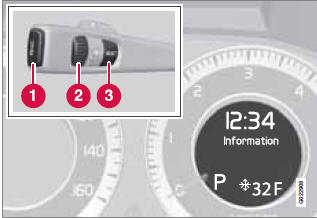
Information display and menu controls
1 READ – access to the list of messages and message confirmation.
2 Thumbwheel – browse among menus and options in the list of functions.
3 RESET – reset the active function. Used in certain cases to select/activate a function, see the explanation under each respective function.
The menus shown on the information displays in the instrument panel are controlled with the left lever. The menus shown depend on ignition mode. Press READ to erase a message and return to the menus.
Menu overview
Driving distance on current fuel reserve
Average
Instantaneous
Average speed
Current speed in mph (Canadian models only)
Engine oil level
Calibrate tire pressure
Messages
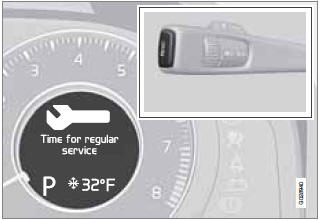
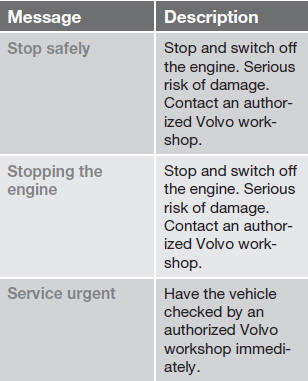
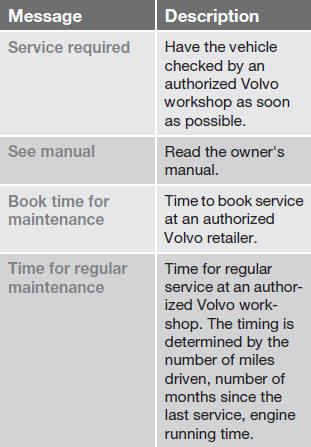
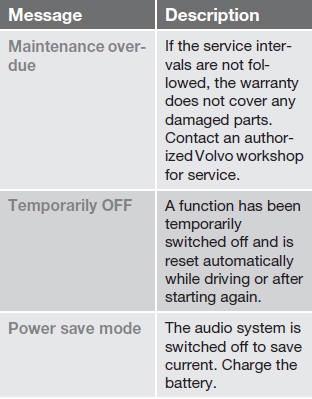
When a warning, information or indicator symbol comes on, a corresponding message appears on the information display. An error message is stored in a memory list until the fault is rectified.
Press READ to acknowledge and scroll among the messages.
NOTE
If a warning message appears while you are
using the trip computer, the message must
be read and confirmed by pressing READ
before the previous activity can be
resumed.
 Volvo Sensus
See also:
Parking Brake
Before leaving the vehicle, make sure that the parking
brake is fully applied. Also, be certain to leave the
transmission in PARK.
The parking brake lever is located in the center console.
To apply the parking brake, pull the lever up as firmly ...
Towing
If towing is necessary, it is best done by
your SUBARU dealer or a commercial
towing service. Observe the following
procedures for safety.
Never tow AWD models (both AT and
MT) with the front wheels raised off
the ground while the ...


