
Volvo XC60: Steering wheel
Adjusting
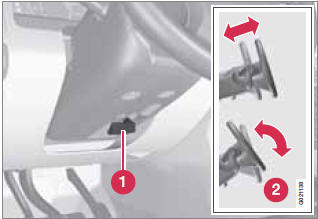
Adjusting the steering wheel
1 Lever for releasing/locking the steering
wheel
2 Possible positions
The steering wheel can be adjusted for both height and reach:
1. Pull the lever toward you to release the steering wheel.
2. Adjust the steering wheel to the position that suits you.
3. Push back the lever to lock the steering wheel in place. If the lever is difficult to push into place, press the steering wheel lightly at the same time as you push the lever.
WARNING
Never adjust the steering wheel while driving.
With the optional speed-dependent power steering the level of steering force can be adjusted, see page 151.
Unlocking/locking
Unlocking
1. Insert the remote key into the ignition slot as far as possible.
2. Press the START/STOP ENGINE button.
> A sound will be audible when the lock releases.
Vehicles with keyless drive*
A remote key must be in the passenger compartment or cargo compartment (but not inserted into the ignition slot) - Press the START/STOP ENGINE button.
> A sound will be audible when the steering wheel lock releases.
Locking
1. Switch off the engine (see page 114 for details).
2. Remove the remote key from the ignition slot.
3. Open the driver's door.
> A sound will be audible when the steering wheel lock engages.
Vehicles with keyless drive*
1. Switch off the engine (see page 114 for details).
2. Open the driver's door.
> A sound will be audible when the steering wheel lock engages.
Keypads
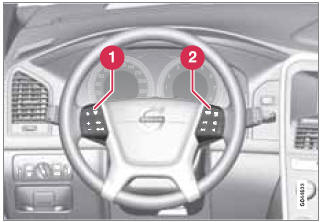
Keypads in the steering wheel
1 Cruise control, see page 152. Adaptive
cruise control*, see page 154.
2 Infotainment controls, see page 207.
Horn
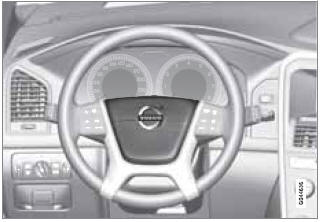
Horn
- Press the steering wheel hub to sound the horn.
 Seats
Seats
See also:
Replacement of lamp bulbs
Before replacing a bulb, ensure the lamp is off. Do not touch the glass part
of the new bulb with your bare fingers; the skin oil left on the glass will evaporate
when the bulb gets hot and the vapour will condense on the reflector and dim the
...
Replacement of light bulbs
Before attempting to replace a light bulb, be sure
the switch is turned to the "OFF" position.
The next paragraph shows how to reach the
light bulbs so they may be changed. Be sure to
replace the burned-out bulb with one of the
sa ...


